In the world of PC gaming, your setup is your signature. It’s a statement of power, personality, and passion. At the heart of this identity is the unmistakable glow of RGB lighting. Now, imagine taking that high-performance aesthetic and applying it to the first thing you see when you go online: your browser.
This is what it means to enter the Republic. We’re talking about an interactive theme built around the legendary
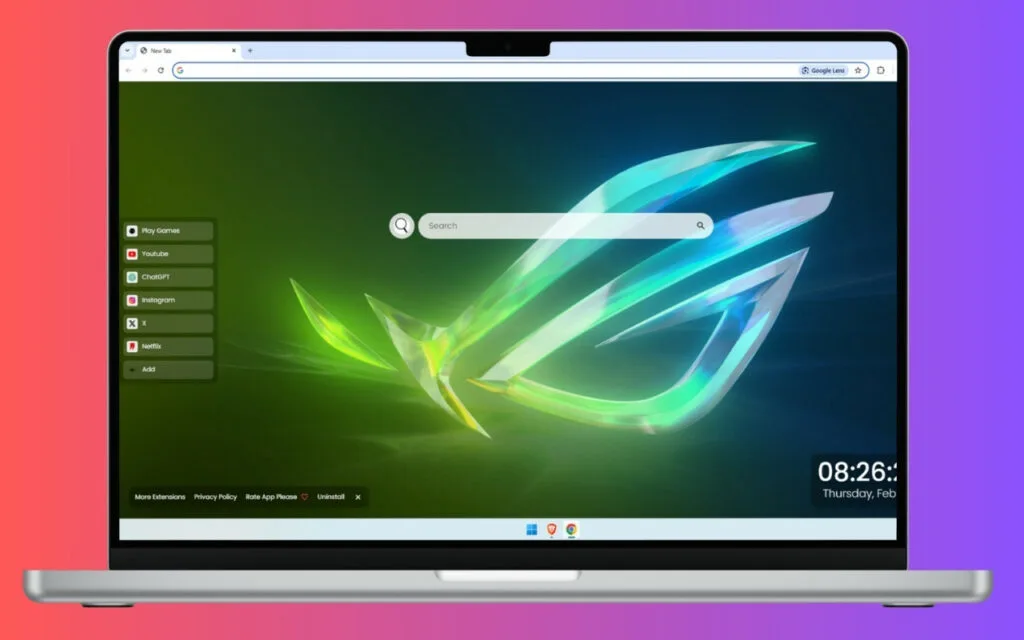
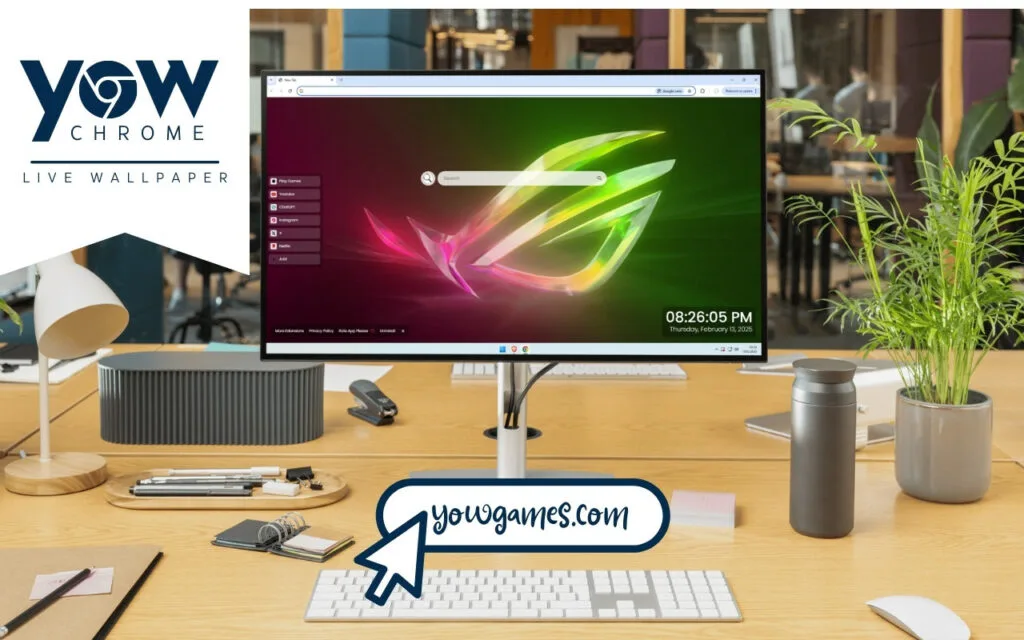
ROG (Republic of Gamers) logo, transformed into a stunning RGB light show. The iconic gaming emblem comes alive, its colors flowing seamlessly from a vibrant, hot pink to an electric, cyber-green. This isn't just a static image; it's a dynamic and mesmerizing display. The sleek design is enhanced by ethereal light trails and sharp, crystalline effects, creating a visual that truly epitomizes gaming excellence.
But this
ROG RGB Live Wallpaper is more than just eye candy. It’s a complete, functional dashboard for your digital life, designed for gamers who demand both form and function. This article explores the origin of the legendary ROG brand, the psychology behind our obsession with RGB, and how this theme turns your simple "new tab" into a high-performance command center.
The Origin of an Emblem: What Is the Republic of Gamers?
To appreciate this
ROG RGB Live Wallpaper, you first have to understand the legacy behind the logo. The "Republic of Gamers" is more than a marketing slogan; it's a core identity in the PC building community, and its origin story is rooted in a simple demand for one thing:
power.
From Niche Hardware to a Global Phenomenon
The Republic of Gamers (ROG) was established in 2006 by ASUS, a titan in the PC component industry. At the time, PC gaming was rapidly evolving, and a dedicated subculture of "overclockers" and "modders" was pushing hardware to its absolute limits. They were a niche, demanding group that standard, mass-market motherboards couldn't satisfy.
ASUS saw this "republic" of elite users and decided to build them their own dedicated hardware. The ROG brand was born. Its mission was simple: to create the most powerful, innovative, and high-performance gaming hardware on the planet. Their first product, the "Crosshair" motherboard, set a new standard for overclocking and features, and the brand never looked back.
The "ROG Eye" Logo: A Badge of Honor
The logo itself—the iconic, angular "ROG eye"—is a symbol. It’s a badge of honor.
- A Mark of Quality: In the PC building world, seeing that ROG logo on a motherboard, graphics card, or laptop means you are getting a premium, performance-focused product.
- A Sign of Belonging: It signifies that you are part of the "Republic"—a community of enthusiasts who value top-tier performance, cutting-edge design, and the gaming lifestyle.
This
ROG RGB Live Wallpaper theme takes that badge of honor and makes it the centerpiece of your browser, reminding you that you're part of that elite community every time you open a new tab.
The Psychology of the Glow: Why Are We Obsessed with RGB?
The second half of this theme's power is its dynamic lighting. The "RGB light show" isn't just a feature; it's the official language of the modern gamer. But why? Why is this
ROG RGB Live Wallpaper so much more compelling than a static image?
More Than Just Lights: RGB as Personalization
Before controllable RGB, PC "modding" was a static affair—cold cathodes and single-color LEDs. RGB, and specifically addressable RGB (aRGB), changed everything. It transformed a PC from a beige box into a living, breathing extension of its user's personality.
The "flowing colors" in this
ROG RGB Live Wallpaper—transitioning from pink to green—represent this power of personalization.
RGB is identity. A user can set their entire setup to a single mood: an aggressive, "in the red" battle mode; a cool, "in the zone" blue; or a custom-matched aesthetic. This theme brings that same dynamic, mood-setting power to your browser, which is arguably the most-used piece of software on your computer.
The "Crystalline Effects" and Gaming Excellence
This theme's design features "ethereal light trails and crystalline effects." These aren't just arbitrary design choices; they are a visual metaphor for high-end technology.
- Crystalline Effects suggest precision, quality, and a "next-gen" feel. They look like a high-tech energy source, perfectly complementing the "gaming excellence" motto of the ROG brand.
- Light Trails evoke speed and movement. They give the static logo a sense of dynamic, high-speed performance, as if it's processing data at an impossible rate.
This
ROG RGB Live Wallpaper doesn't just
show you the ROG logo; it
animates it with the very concepts of speed, power, and precision that the brand stands for.
Beyond the Aesthetic: A Functional Dashboard for Gamers
This is where this theme truly separates itself from a simple background. A true member of the Republic of Gamers knows that aesthetics are nothing without performance. This
ROG RGB Live Wallpaper is a high-performance, functional dashboard.
Your Personal Battle Station Interface
This theme comes pre-loaded with a clean, intuitive, and non-intrusive UI that gives you instant access to your digital life, all while the logo glows in the background.
- 🔗 Quick Access Shortcuts: Your most-used destinations are front and center. Get instant access to YouTube (for game tutorials or reviews), Netflix (for downtime between raids), and ChatGPT (for research or coding).
- ➕ Custom Shortcuts: This is the real power. This feature allows you to build your own personal command center.
- 🔍 Search Bar: A clean, central search bar that’s seamlessly connected to your default search engine. No hunting for the URL bar.
- 🕒 Clock & Date: A modern, minimalist display of the time and date. It's an essential quality-of-life feature that keeps you on track during those "just one more turn" gaming sessions.
Tips for Curating Your Ultimate Gaming Dashboard
This is the "how-to" for collectors and power users. How do you take this
ROG RGB Live Wallpaper and make it truly your own? You use the
➕ Custom Shortcuts feature to build a dashboard tailored for a gamer's life.
- Create a "Gaming" Hub: Add one-click shortcuts to your essential clients and communities.
- Steam
- Epic Games Store
- GOG Galaxy
- Discord
- Twitch
- Build a "Resources" Cluster: For the dedicated PC builder and enthusiast.
- Links to your favorite hardware review sites.
- A shortcut to your graphics card's driver download page (NVIDIA or AMD).
- A link to PCPartPicker for your next dream build.
- Organize Your "Content" Row: If you're a streamer or content creator.
- A link to your Twitch dashboard.
- Your YouTube Studio analytics page.
- A shortcut to your streaming software (like OBS or Streamlabs).
Standard Browser vs. ROG RGB Gaming Dashboard
| Feature |
Standard Browser New Tab |
ROG RGB Live Wallpaper Theme |
| Visuals |
Blank white page or generic search logo. |
Dynamic, animated ROG RGB light show with crystalline effects. |
| Aesthetics |
Sterile, uninspiring, and purely functional. |
Immersive, high-energy, and a statement of your "gamer" identity. |
| Quick Access |
A few "most visited" sites, often cluttered. |
Curated, icon-based shortcuts (🔗) for key services (YouTube, etc.). |
| Personalization |
Very limited; maybe a static background. |
Deep customization (➕) to build your own personal dashboard. |
| Integrated Tools |
Just the search bar. |
🔍 Search, 🕒 Clock & Date, and custom shortcuts in one clean UI. |
Join the Republic
This
ROG RGB Live Wallpaper is more than a theme. It's a statement. It’s an understanding that the line between our digital lives and our personal identities has blurred. We don't just
use our computers; we
inhabit our setups.
It takes the legendary "ROG eye"—a symbol of uncompromising quality and performance—and fuses it with the dynamic, personal language of RGB. But it doesn't stop at beauty. It delivers a truly functional and productive experience, turning your everyday browser into a command center that is as powerful as it is stunning.
It's the ultimate browser upgrade for anyone who believes gaming isn't just a hobby, but an aesthetic, a community, and a standard of excellence.
What's your all-time favorite RGB color scheme for your gaming setup? Let us know in the comments below!