
"Swish and flick!" For over two decades, the Wizarding World has captivated millions, teaching us that magic can be found in the most unexpected places—even on your computer screen. Whether you are waiting for your Hogwarts letter or re-reading The Prisoner of Azkaban for the tenth time, the magic doesn't have to end when you close the book.
It is time to transform your daily browsing into a spellbinding adventure. With the Harry Potter Cursor ★ Custom Cursor for Chrome™, you can replace your standard, muggle mouse pointer with over 100+ custom cursors featuring the most iconic characters, artifacts, and symbols from the franchise.
In this article, we will explore the enduring legacy of J.K. Rowling’s universe, dive into the lore behind these magical cursors, and provide expert tips on how to turn your browser into a digital Marauder's Map.

The Magic of Digital Customization: Why We Love It
To understand why the Harry Potter Cursor ★ Custom Cursor for Chrome™ is a must-have for fans, we have to look at the history of the fandom itself. Since The Philosopher's Stone hit shelves in 1997, fans have sought ways to immerse themselves in the world of Hogwarts.
From Books to Browser
In the early 2000s, fans expressed their love through forums and fan fiction. Today, digital customization is the new frontier. This extension taps into a deep sense of nostalgia. Seeing a tiny Golden Snitch zip across your screen or wielding the Elder Wand to click a link isn't just functional; it's an act of storytelling. It allows you to reclaim your digital space and fill it with the wonder of your childhood.
A Cursor for Every House
The popularity of this collection lies in its variety. It acknowledges that every fan is different.
-
Gryffindors might choose the sword of Godric Gryffindor to show bravery.
-
Slytherins might prefer the Dark Mark or Draco Malfoy’s wand to signal ambition.
-
Ravenclaws and Hufflepuffs are equally represented, ensuring that no matter where the Sorting Hat placed you, your cursor matches your identity.

Unlocking the Archive: 100+ Ways to Cast a Spell
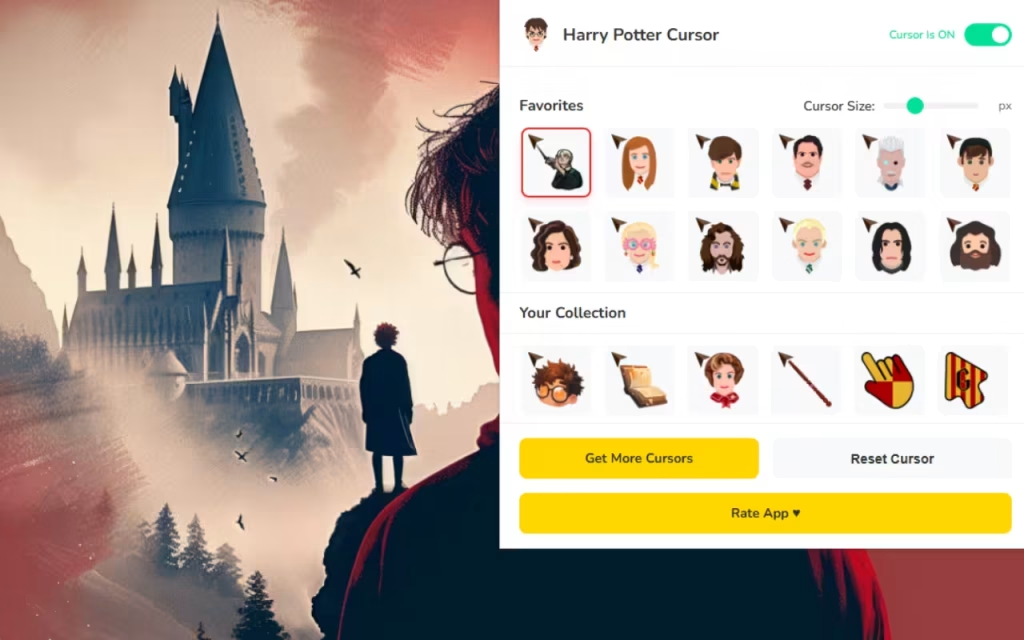
The Harry Potter Cursor ★ Custom Cursor for Chrome™ extension is a veritable Room of Requirement for digital assets. Let’s explore the rich lore and details behind the cursors you can equip.
🧙♂️ Fan-Favorite Characters & Lore
The collection brings the personalities of beloved characters to your fingertips:
-
Harry Potter: The Boy Who Lived. His cursor often features his lightning bolt scar or his glasses, symbolizing resilience and hope.
-
Severus Snape: The Half-Blood Prince. A cursor featuring Snape often includes his potion vials or his doe Patronus, reminding us of his complex, tragic loyalty ("Always").
-
Hermione Granger: The brightest witch of her age. Use her Time Turner cursor when you need to be productive and multitask!
-
Lord Voldemort: For those who appreciate the Dark Arts, a cursor of He-Who-Must-Not-Be-Named or Nagini adds a menacing, powerful vibe to your screen.
-
Dobby: The free elf. His cursor is a reminder of friendship and the price of freedom (often accompanied by a sock!).
🪄 Iconic Items of Power
It’s not just about people; it’s about the magical objects that define the series.
-
The Elder Wand: One of the Deathly Hallows. Using this as your pointer makes you feel like the master of your digital domain.
-
The Marauder’s Map: "I solemnly swear that I am up to no good." Perfect for browsing social media or gaming when you should be working.
-
The Golden Snitch: Catching this cursor requires no broomstick, but it brings the thrill of Quidditch to every click.
Features That Magically Enhance Your Experience
This extension is designed with the precision of a charm by Professor Flitwick. It balances high-quality art with smooth performance.
⚡ Technical Highlights
-
100+ Wizarding Cursors: A massive library covering books, movies, and Hogwarts Legacy themes.
-
🦁 All Four Houses: Dedicated sections for Gryffindor, Slytherin, Ravenclaw, and Hufflepuff crests and colors.
-
🎯 Resizable & Lightweight: Whether you have a 4K monitor or a laptop, the Adjustable Size feature (16px to 128px) ensures your magic is always visible without slowing down your browser.
-
🔁 Easy Cursor Switch: Instantly swap from a "Study Mode" Hermione cursor to a "Fun Mode" Weasley twin cursor with a single click.

Character Match-Up: Which Cursor Suits Your Vibe?
With over 100 options, choosing can be harder than a N.E.W.T. exam. Here is a guide to help you decide.
| Character / Item | Vibe & Meaning | Best Used For... |
| Albus Dumbledore | Wisdom & Power | Research, Studying, Mentoring |
| Draco Malfoy | Ambition & Style | High-End Shopping, Social Media |
| Luna Lovegood | Whimsy & Creativity | Art, Design, Reading Fanfiction |
| Bellatrix Lestrange | Chaos & Intensity | Gaming, Competitive Tasks |
| Time Turner | Efficiency & Focus | Productivity, Meeting Deadlines |
| Hogwarts Letter | Nostalgia & Hope | Checking Email, Messaging Friends |
Tips for Collectors: Building Your Wizarding Desktop
If you love the Harry Potter Cursor ★ Custom Cursor for Chrome™, why stop there? You can create a "similar decoration" style for your entire computer to match the magical theme.
1. Creating a Themed Environment
Your cursor needs a castle to roam.
-
Browser Themes: Match your cursor to your house. If you use a Slytherin cursor, set your Chrome theme to Emerald Green and Silver. For Gryffindor, go with Deep Scarlet and Gold.
-
Soundscapes: Enhance the atmosphere by playing "Hogwarts Library Ambience" or the film score in a background tab.
2. Safe Collecting Tips
For digital collectors, safety is key.
-
Verify Sources: Only download extensions from the official Chrome Web Store to ensure they are free of Nargles (malware).
-
Organize Favorites: Use the extension's Favorites Feature to create "Loadouts." Have a "Dark Arts" loadout (Voldemort, Bellatrix, Elder Wand) and a "Dumbledore's Army" loadout (Harry, Ron, Hermione).
Why This Extension is Magical
In a world of muggle technology, the Harry Potter Cursor ★ Custom Cursor for Chrome™ offers a spark of enchantment. It brings the "Fan-Favorite Characters" and "Iconic Items" of the series to the tool you use most: your mouse.
It is Fan-Focused, meaning the designs capture the small details that only true Potterheads appreciate—like the crack in the Resurrection Stone or the specific wood grain of a wand. It creates an immersive experience that makes you feel like a student at Hogwarts.
Key Highlights Summary
-
Variety: 100+ options covering the entire saga.
-
Usability: Simple interface with instant switching.
-
Performance: Lightweight code that runs smoother than a Firebolt.
"Hogwarts will always be there to welcome you home." The Harry Potter Cursor ★ Custom Cursor for Chrome™ is more than just a novelty; it is a digital portkey back to that home. It allows you to carry the spirit of magic into every corner of the internet.
Whether you want to duel with the Elder Wand or explore the web with Luna Lovegood's Spectrespecs, this extension has something for every witch and wizard. It is lightweight, free, and absolutely packed with magic.
Are you ready to board the Hogwarts Express? Download the extension today and let the magic begin!
Tell us in the comments below: Which magical object would you choose to have in real life—the Invisibility Cloak, the Elder Wand, or the Resurrection Stone?







